All the ControlDraw 3 licensing restrictions have now been removed, even expired evaluation versions will now run again and with no limits
Yes ControlDraw 3 is now free. You can downloaded it and use it indefinitely without having to obtain a license. And you won't have to wait to obtain a license to use CD in it's full glory!
Why do this?
Existing users will no longer need to get a new license when they change their PC.
Existing plants which have CD in their documentation will be able to provide support for it.
Educational institutions can freely use it.
Showing posts with label ControlDraw Release. Show all posts
Showing posts with label ControlDraw Release. Show all posts
Tuesday, 15 December 2015


Monday, 3 September 2012
ControlDraw Model to Web Site
ControlDraw now provides the ability to generate a web site from the model.
This means that people will be able to view a model without the need to install any software or work from PDF output from the Reviewer.
The web version is of course much simpler than the original model and does not support such functions as running diagrams in simulation mode. However it is still useful.
Example is available to view here.
You can click on the objects that have numbers by them to go to the detailed diagram for the object,much like you can in ControlDraw itself
Each web page is a diagram page in the ControlDraw model.
Each ControlDraw diagram page is saved as a png file including automatic generation of the hot spots as an HTML ImageMap
The page description HTML was generated from the page RTF text
A more advanced version will soon be available that supports navigation view with a Hierarchical menu
ControlDraw now provides the ability to generate a web site from the model.
This means that people will be able to view a model without the need to install any software or work from PDF output from the Reviewer.
The web version is of course much simpler than the original model and does not support such functions as running diagrams in simulation mode. However it is still useful.
Example is available to view here.
You can click on the objects that have numbers by them to go to the detailed diagram for the object,much like you can in ControlDraw itself
Each web page is a diagram page in the ControlDraw model.
Each ControlDraw diagram page is saved as a png file including automatic generation of the hot spots as an HTML ImageMap
The page description HTML was generated from the page RTF text
A more advanced version will soon be available that supports navigation view with a Hierarchical menu
Friday, 20 July 2012
New Start option - Larger Windows and Fonts
ControlDraw has been going for a long time, since before Windows XP in fact.
As Windows has developed and computers have arrived with large High Resolution displays, the standard size of the various ControlDraw windows has remained the same. This has had the effect of making them too small for some users and furthermore the latest versions of Windows 7 have a larger default font size. As a result some users were finding that the text in the labels and button etc in the ControlDraw windows did not fit the available space.
The latest version of ControlDraw now provides a solution by providing a selection at the Login screen.
As you change the option you can immediately see the effect.

As Windows has developed and computers have arrived with large High Resolution displays, the standard size of the various ControlDraw windows has remained the same. This has had the effect of making them too small for some users and furthermore the latest versions of Windows 7 have a larger default font size. As a result some users were finding that the text in the labels and button etc in the ControlDraw windows did not fit the available space.
The latest version of ControlDraw now provides a solution by providing a selection at the Login screen.
As you change the option you can immediately see the effect.
So, if you find the screens too small, or have the Window 7 problem we hope this helps you.
Monday, 23 May 2011
ControlDraw version 3.6.1210 - Faster and Smarter
This new release provides some great improvements, especially for those of you who have large models and who want to use the Recipe Modelling capabilities to define master recipes.

The improved Diagram List view - this now shows the link page and link type and allows you to change them and to change object classes.
In addition it is now possible to view and hide/unhide diagram objects from the List View.
Hidden objects do not appear on diagrams but still generate data.
If a diagram has hidden objects a count of them automatically appears on the diagram. There is also a new special symbol, 'Hidden Symbols' that you can put on a diagram to show a list of them
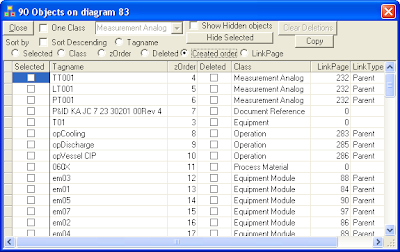 When using the Descended Objects to create recipe parameters you are now asked whether to make them hidden. This is mainly intended to support things like recipes that can have a large number of parameters that you still want in the data tables.
The improvements with handling large models are mostly speed, large diagrams load much faster and the data build process has been accelerated. Where ControlDraw used to read the records and rebuild all objects when a diagram was opened and then save all the records when the diagram was closed, it now (optionally) only reads and updates on a symbol basis. For large diagrams the improvement is large, a complex diagram with about 200 objects including a large state matrix now loads in under 2 seconds compared with 8 seconds on a 3 yr old PC that is not state of the art.
The Recipe Modelling developments are mainly intended to support recipes that can have a large number of parameters. For example the Descended Objects view can be used to create parameters in a Recipe Procedure by scanning all the child hierarchy of a recipe type diagram and finding all the lower level parameters (typically in Phases or Operation) and making copies of them.

In addition it is now possible to view and hide/unhide diagram objects from the List View.
Hidden objects do not appear on diagrams but still generate data.
If a diagram has hidden objects a count of them automatically appears on the diagram. There is also a new special symbol, 'Hidden Symbols' that you can put on a diagram to show a list of them

The improvements with handling large models are mostly speed, large diagrams load much faster and the data build process has been accelerated. Where ControlDraw used to read the records and rebuild all objects when a diagram was opened and then save all the records when the diagram was closed, it now (optionally) only reads and updates on a symbol basis. For large diagrams the improvement is large, a complex diagram with about 200 objects including a large state matrix now loads in under 2 seconds compared with 8 seconds on a 3 yr old PC that is not state of the art.
Subscribe to:
Posts (Atom)

