When you are specifying or designing a system it is generally necessary to keep a collection of documents, such as the P&ID's, Process descriptions and so on. Often these documents can become superseded by a model, but it is always useful to be able to refer back to them, to ensure traceability and to be able to check back. Keeping track of these can be tedious.ControlDraw has long supported simple hyperlinks, provided you had a web or file address on the first line of an object's text. This has been greatly improved recently.
You can now set a Linked Documents Path that is a top level folder that contains all the documents that you want to be able to open from a model.
You can also copy File Names in Explorer and then paste them as hyperlinks.
Showing posts with label Tips. Show all posts
Showing posts with label Tips. Show all posts
Friday, 23 July 2010


Monday, 21 September 2009
Tips on Drawing Diagrams
Swap two objects:
You can very quickly swap two objects by dragging one onto anotherr.
An example might be where you want to move a step in an SFC.
Normally the Swap option is only offered when the two objects have the same class but if you hold down Shift then it apples to objects of any class
You can very quickly swap two objects by dragging one onto anotherr.
An example might be where you want to move a step in an SFC.
Normally the Swap option is only offered when the two objects have the same class but if you hold down Shift then it apples to objects of any class
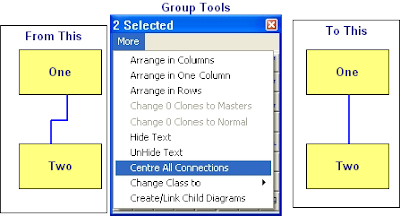
Centre Connections:
If you want to centre the connections between symbols it is very easy using the Centre all connections option in the Group More menu, this will place all the connection points at the mid point of the side they are on.
If you want to centre the connections between symbols it is very easy using the Centre all connections option in the Group More menu, this will place all the connection points at the mid point of the side they are on.
Change Case
It is really annoying to find that the text you have just typed is all in UPPER CASE!
Well, just like MS Word, with ControlDraw it is easy to fix, just use Shift-F3 and the text (for example a Tagname or Object description) will toggle between Upper, Lower and the First Letter Upper and the rest lower.
Well, just like MS Word, with ControlDraw it is easy to fix, just use Shift-F3 and the text (for example a Tagname or Object description) will toggle between Upper, Lower and the First Letter Upper and the rest lower.
Editing Line Positions
 Double click a line and if it has more that two segments each segment that is not at an end of the line shows a number in the middle. You can drag this to move the connection segment.
Subscribe to:
Posts (Atom)

